How to Host a Virtual Trivia Night Online
A virtual trivia night is a live quiz played over a video call. Everyone joins Zoom, Google Meet or Teams to see and hear each other, and answers questions on their own phone. With Trivia Rush it's free, there's nothing to download, and nobody needs an account. The game asks the questions and keeps score, so you get to play too. Here's how to run one in about 15 minutes of setup.
Start a Free GameWhat You Need
- A video call: Zoom, Google Meet, Microsoft Teams, FaceTime or Discord all work.
- A phone or second browser tab for each player to answer on.
- Trivia Rush, open in any browser. Free, no app, no sign-up.
- Optional: a co-host to watch the chat and help latecomers.

How to Run a Virtual Trivia Night, Step by Step
1. Pick a date and send the invite
Weeknights around 7pm and Sunday afternoons work well for friends and family. Send the video call link a few days ahead and say it'll take about an hour. For a bigger crowd, line up a co-host to keep an eye on the call chat while you run the game, so nobody misses a latecomer or a dropped connection.
2. Decide solo or teams
Solo play is the default, and it's best for up to about 10 people: everyone joins on their own phone and adds their own category. Running a bigger group, or want a team vibe? Put each team on one phone. The team agrees on one category, enters it together, and argues answers in its own breakout room before anyone taps.
3. Start a game on Trivia Rush
A few minutes before start, open Trivia Rush and tap New Game. On the Game Setup screen, leave the Party/Solo toggle onParty (it's the default), pick your own category, and tapLet's Go! That takes you to the Invite Friends screen. No account, no download. Curious how a round actually plays out? See how a round plays out.
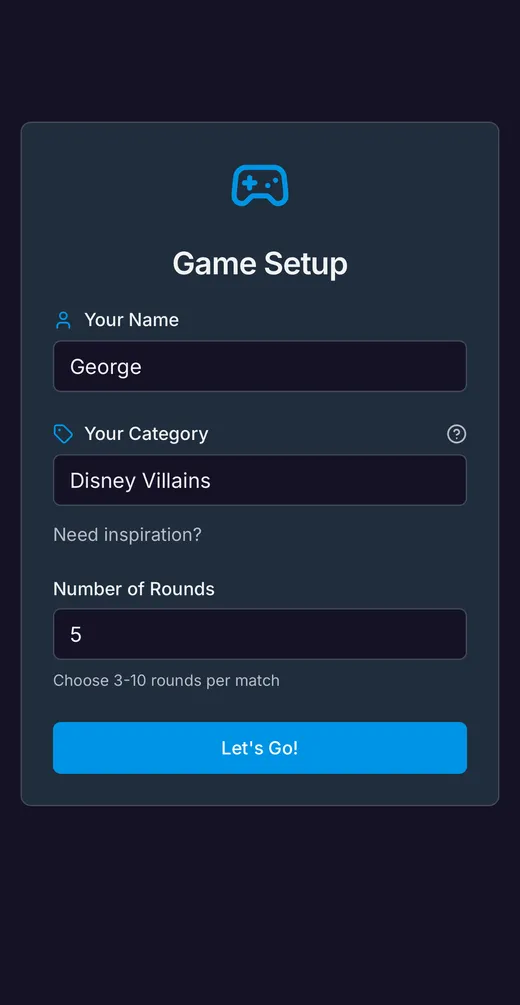
4. Share the game link in the call chat
On the Invite Friends screen, tap Copy Invite Link and paste it into the Zoom, Meet or Teams chat. Players tap it on their phones and they're in: no app-store download, no login screen, no accounts. Start Game lights up once two players have joined, but hold off until everyone is in and has added a category.
5. Let everyone add a category
Each player types any topic they like: 90s movies, the Bears, Taylor Swift, their family's hometown. Trivia Rush blends everyone's picks into one shared set of questions, so every round has something for everyone, and nobody knows what's coming next, including you. Once the whole group is in, tap Start Game.
6. Play, and talk between questions
Every player sees the current question on their own phone, with a footer showing everyone's live score and the clock. One game is a five-round match against the clock that usually wraps in about 15 minutes. Stay unmuted between questions for the banter; that's what makes a virtual night feel like a real one.
7. Crown a winner and run it back
When the last round locks in, Trivia Rush shows the results screen: the winner, plus overall and category rankings. Hold your phone up to the camera so everyone sees it, and let the gloating begin. No tallying paper scorecards, no host doing math while everyone waits. Hand out a silly prize (first pick of a theme for the next match works well), then start another game with new categories. Keep a running tally across matches if you want to crown a grand champion for the night.
Sample 60-Minute Virtual Trivia Night
One Trivia Rush game is a five-round match that runs about 15 minutes, so an hour fits three matches with breathing room.
| Time | What happens |
|---|---|
| 0:00–0:05 | Hellos, latecomers join, post the game link in the call chat |
| 0:05–0:20 | Match 1: everyone adds a category (the first round doubles as practice) |
| 0:20–0:25 | Results on camera, banter, short break |
| 0:25–0:40 | Match 2: new categories (try a theme like 90s movies) |
| 0:40–0:55 | Final match: the leader picks a theme and everyone adds a category that fits it |
| 0:55–1:00 | Crown the champion, plan the next one |
Groups drift between matches: someone grabs a drink, someone's phone goes to sleep. Keep things moving by posting the next game's invite link in the chat right away and starting as soon as most people are back.
Need a Match 1 lineup? 4 players, 4 sneaky picks: Disney, 90s Movies, Sports, and Science. One blended gauntlet. Nobody plays their own category alone; every question from all four picks lands in the same shared round, so the person who typed in Disney still has to answer a Science question two rounds later.
Virtual Trivia Tips: Teams, Breakout Rooms and Tech
- Ask everyone to join the call on a laptop or TV and play on their phone. One screen to watch, one to tap.
- For teams, open breakout rooms (or team group chats): each team shares one phone and one category.
- On a big call, mute during questions and unmute between them.
- Test your screen share and audio early.
- Keep it to about an hour; virtual attention fades fast.
- Theme it: a 90s night, a sports night, a family-history round.
The Secret to Winning: Your Category Pick
Here's the part no generic hosting guide can tell you: your category pick is your whole strategy. Since every entry gets folded into one shared question set, the smartest move is picking something you know cold that your rivals don't. Think Geography if you're the only one who's actually left the country, or History if you're the one who remembers every date from class. Those questions still show up in everyone else's round; they just land hardest on you. Nobody else in the room can prep for your pick either, since they won't know what it is until the questions start showing up mixed in with theirs. Pick something obscure enough and you'll watch the rest of the table stare blankly at a question you could've answered in your sleep.
Hosting In Person Instead?
This is Trivia Rush at its best. No printed answer sheets, no projector, no one reading questions off a clipboard. Everyone pulls out their own phone and races head-to-head, live. Every step above works the same: skip the video call and drop the invite link in your group chat. It's a hit at parties and team events too.

Night-of Checklist
- ✓ Charged phones for every player
- ✓ Wifi password (or a hotspot) ready to share
- ✓ One host phone or laptop to start the game and share the link
- ✓ Categories picked in advance, or leave it a surprise
- ✓ Snacks, because someone always asks
- ✓ A prize for the winner, even a ridiculous one, raises the stakes
- ✓ Test screen share and audio
- ✓ Post the game link in the call chat
Need Category Inspiration?
Grab one of these to get everyone's competitive juices flowing, or go pick something nobody's expecting.
Music
Chart-toppers, one-hit wonders, garage bands, and stadium anthems. Music trivia spans every genre and generation. Name the artist, finish the lyric, and out-rush the room to the buzzer.
Geography
Capitals, oceans, mountains, and borders from every corner of the map. Geography trivia turns the globe into a playground: the faster you place it, the higher you climb the leaderboard.
History
Empires, revolutions, inventions, and the people who changed the world. History trivia connects the dots across centuries. Recall the dates and names faster than your rivals to rule the round.
90s Movies
From Titanic's record-shattering box office to Pulp Fiction's razor-sharp cool, the 1990s stacked blockbusters, indie darlings, and endlessly quotable one-liners. Prove you remember the decade that shaped modern cinema.
Planning a throwback night? Start with our 90s movie trivia questions.
Browse all categories →FAQ
Do I need to download anything to host a trivia night?
No. Trivia Rush runs in the browser on every player's phone. There's no app store, no install, and no account to create.
Does everyone play the same questions, or do we each get our own category?
There's one shared question set for the whole game. Every player's category pick gets blended together, so the round draws from everyone's entries at once. Nobody plays a private round in their own category.
What if my group can't be in the same room?
Trivia Rush works the same way over a video call. Hop on Zoom, Google Meet, FaceTime, or Discord for the chat, and everyone still plays live from their own phone.
How many people can host a trivia night with Trivia Rush?
You need at least two players to start a game, and it plays best with up to about 10 people, each on their own phone. For a bigger group, split into teams and give each team one phone.
Is Trivia Rush free to host with?
Yes, completely free, with no account required and nothing to pay to play.
How long does a typical game take?
One game is a five-round match and usually wraps in about 15 minutes. Start another the moment the last one ends, or call it after one if that's all the time you've got.
How do you run a virtual trivia night on Zoom?
Start a Zoom call, open Trivia Rush and start a free game, paste the game link into the Zoom chat, and have everyone play on their phones while you stay on video together. The game asks the questions and keeps score.
Is there a free way to host trivia online?
Yes. Trivia Rush is free to play, runs in the browser, and needs no download or account for the host or players.
How long should a virtual trivia night be?
About an hour: three five-round matches, each about 15 minutes, with short breaks between them. Shorter than an in-person quiz, because attention drops faster on video.
Do I need to write my own questions?
No. Each player enters a category and Trivia Rush builds one blended question set from everyone's picks, so the host can play too.
Can teams play together remotely?
Yes. Either everyone plays individually, each adding their own category, or you split into breakout rooms with one phone per team, and each team enters one shared category. Either way, every category is blended into one shared question set.
Ready to Host Your Own?
Pick a night, share one link, and let Trivia Rush do the rest.
Play Trivia RushNo account needed · Play instantly · Free forever